


PowerDMS Mobile Apps for Public Safety Teams
Public safety work happens beyond the desk. PowerDMS mobile apps give personnel access to policies, training, wellness resources, off-duty jobs, and schedules from supported iOS and Android devices.
Built for Teams Working in the Field
PowerDMS offers separate apps for different products. Employees can use the app connected to their organization’s subscribed products to find information, complete supported actions, and stay informed while working in the field.
Download the PowerDMS Mobile Apps
Give employees another way to access PowerDMS when they’re away from their computers.
Available functions depend on the organization’s licensed products, user permissions, application version, and configuration. Some administrative and configuration tasks may still require the desktop experience.
PowerDMS Mobile Features
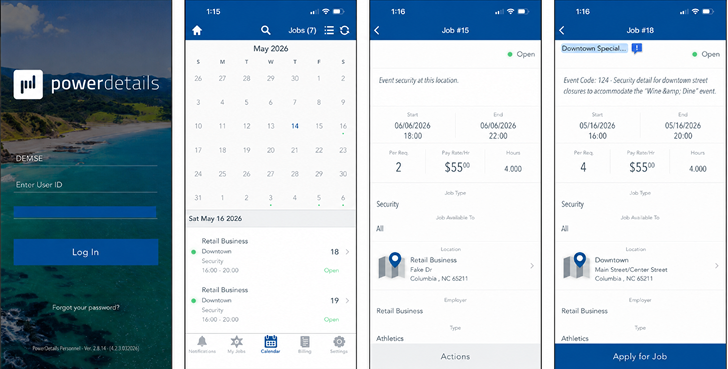
The PowerDetails app helps personnel find agency-approved off-duty, overtime, and extra-duty jobs and complete supported job-bidding and scheduling activities from an iPhone or Android device.
The PowerDMS app supports mobile access for PowerPolicy, Training, and PowerRecall. Personnel can search approved content, open supported files, review assignments, complete supported learning activities, and acknowledge required updates.
The PowerLine app gives authorized personnel anonymous access to a nationwide peer network, wellness content, agency resources, and supported group sessions at any time.
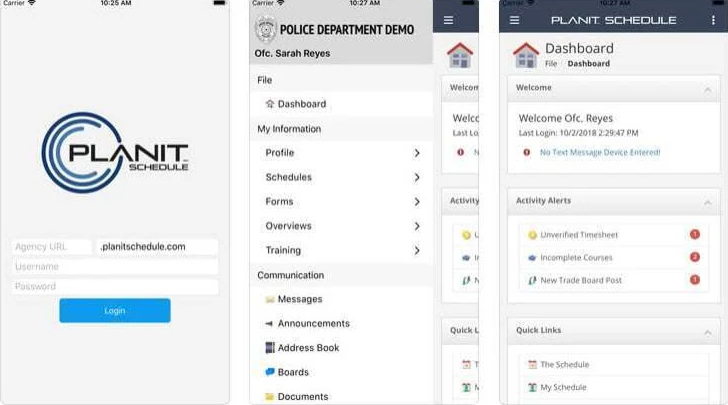
PowerTime customers use the PlanIt Schedule app for mobile access to schedules, time-off requests, overtime submissions, open shifts, and shift-trade requests.
Use push notifications to alert employees to important updates and required actions without relying on them to check email from a desktop.
Common Questions About PowerDMS Mobile Apps
The download section on this page includes verified Apple App Store and Google Play links for PowerDMS Policy Management, PowerLine by NEOGOV, PowerDetails, and PowerTime (PlanIt Schedule).
The PowerDMS app supports PowerPolicy, Training, and PowerRecall workflows. Users can access approved content, search documents, open supported file types, review and sign assigned content, complete supported learning activities, and receive notifications.
PowerLine provides anonymous access to peer support, wellness content, agency resources, and supported group sessions for law enforcement and first responders.
PowerDetails helps law enforcement personnel find agency-approved off-duty, overtime, and extra-duty jobs and complete supported job-bidding and scheduling activities.
PowerTime was previously named PlanIt Schedule. The current Apple App Store and Google Play listings still use the PlanIt Schedule name, and PowerDMS identifies it as the mobile app for PowerTime customers.
Yes. Each app requires access provided through an organization that licenses the corresponding product. Employees should use the account or invitation information supplied by their organization.
Yes. Employees can review and sign assigned policies and updates from supported devices. PowerDMS also supports biometric signing on compatible devices.
Yes. The app can notify users when a new policy or updated version requires review, acknowledgment, or signature. Device and application notification settings must allow PowerDMS notifications.
Mobile capabilities vary by product, permissions, configuration, and app version. Some document editing, reporting, workflow creation, scheduling administration, and configuration tasks may require the desktop experience.